
How to See Google Classroom Assignments in Your Family Google Calendar
Google Classroom does auto-create a calendar for each class, and assignments with due dates appear there automatically. The catch: those calendars live inside your student's school Google account, not your personal Gmail — so parents can't see homework due dates in their family calendar without extra work. Below is what Google offers natively, plus how CalPilot bridges the gap.
Why parents can't see Classroom assignments today
Schoolwork is one of the most-asked-about gaps in a family calendar: the assignments are in Google Classroom, the parents are on personal Gmail accounts, and Google's own permission model makes it hard to bridge the two. Some districts disable Classroom calendar sharing entirely; others allow it but only one class at a time. CalPilot is building a single read-only bridge that mirrors a student's classwork into the parent's Google Calendar — without sharing the student's credentials.
What Google offers natively (and where it falls short)
- 1
Open the class on classroom.google.com
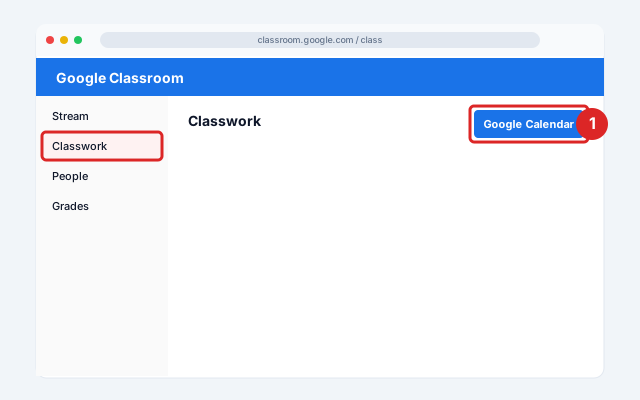
From classroom.google.com, students click into a class → Classwork tab → Google Calendar (top of the page). This opens the class's calendar with all assignment due dates.
- 2
Limitation 1 — class calendar lives in the school account
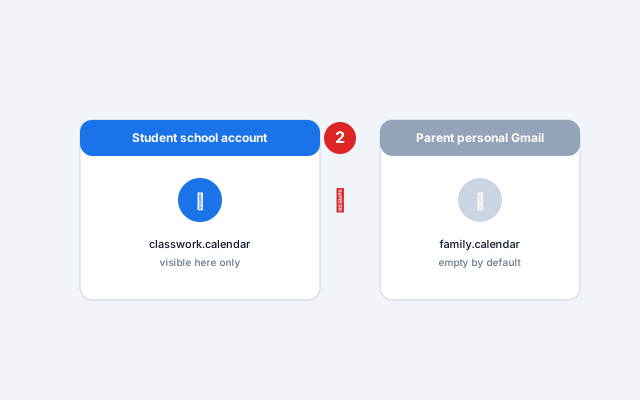
The calendar is in the student's school Google account. Parents on a personal Gmail can't see it unless the student manually shares each class calendar — and many school accounts block external sharing.
- 3
Limitation 2 — individual assignments are hidden
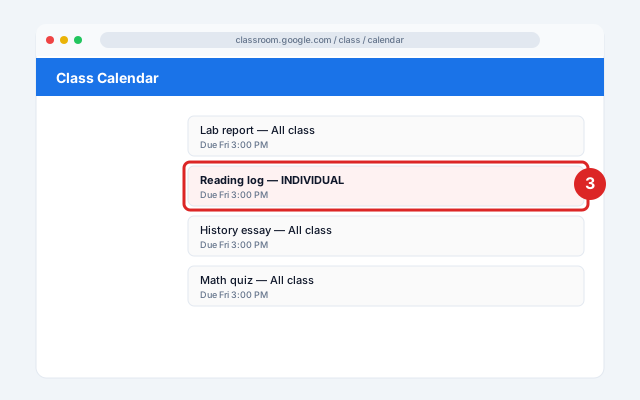
Items assigned to individual students (not the whole class) don't appear in Google Calendar at all — only in the Classroom calendar view.
- 4
Limitation 3 — districts may disable Calendar entirely
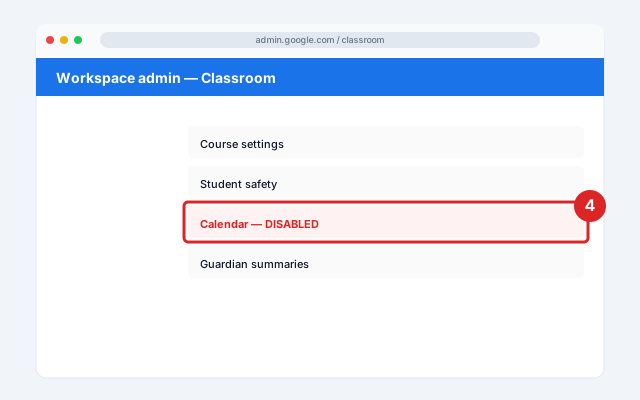
Many school districts disable Calendar in Classroom entirely via Google Workspace admin settings — in which case no parent-visible calendar exists at all.
Official screenshots and the latest menu paths: Google Classroom Help Center.
How CalPilot will bridge the gap
Once we ship the Classroom integration, you'll sign in once with the student's school Google account using a read-only classroom.coursework.me.readonly scope, pick which classes to mirror, and choose a destination calendar in the parent's Google Calendar. CalPilot pulls assignments and due dates and writes them as read-only events in the family calendar. Works across multiple kids in different schools — and CalPilot never modifies anything on the school side.
Common issues and fixes
I don't see any class calendars in Google Calendar
Either (a) your school admin disabled Calendar for the Classroom domain, or (b) the class hasn't created any assignments with due dates yet.Why can't I see my child's homework?
You're signed into your personal Gmail; their class calendars are in their school Google account. This is the core problem CalPilot's Classroom bridge will solve.Assignments are missing
Items assigned to individual students (vs. the whole class) only show on the Classroom calendar, not Google Calendar.
Frequently asked questions
Related sync guides
Outlook
Publish your Outlook calendar once, then see your work meetings in your personal Google Calendar — read-only, no credentials.
GameChanger
Baseball, softball, and Game Stream apps — 15-minute refresh, no more missed rainouts.
iCloud
Mirror iCloud calendars (including Family Sharing) into Google Calendar without changing your default app.
CalPilot was built by Eric Weissmann — a baseball dad who got tired of retyping game schedules every week and started bridging other family-calendar gaps from there. More about the project.